
- #why-use-bike-computers - Why Cyclists Benefit From Turn-by-Turn Navigation
- #key-features - Key Features to Look for in a Cycling GPS
- #top-bike-computers - Top Bike Computers with Turn-by-Turn Navigation
- #real-world-performance - Real-World Performance and User Experiences
- #installation-tips - Installation and Mounting Tips
- #battery-life-considerations - Battery Life and Power Management
- #smart-integration - Integration With Apps and Sensors
- #customization-options - Customization Options for Personalized Use
- #troubleshooting-common-issues - Troubleshooting Common GPS Problems
- #making-the-right-choice - How to Choose the Best Device for Your Needs
1. Why Cyclists Benefit From Turn-by-Turn Navigation
Modern cycling has evolved beyond traditional maps and instinctive navigation. Whether you are an urban commuter, weekend warrior, or competitive road racer, knowing exactly where to turn can save time, reduce stress, and enhance overall ride enjoyment.
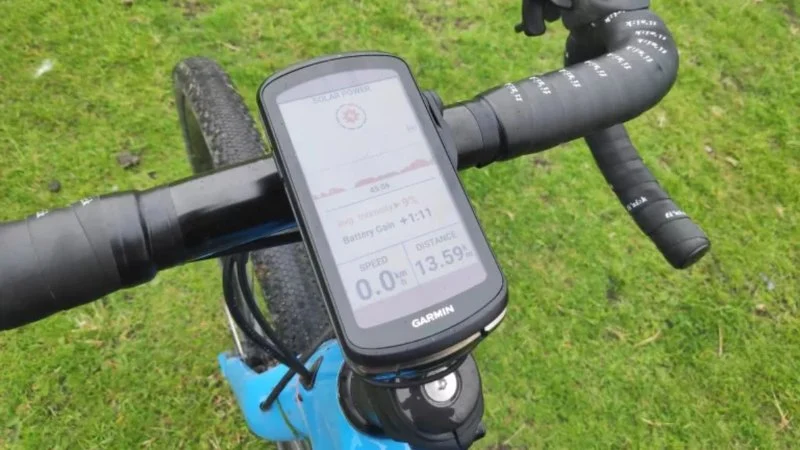
Turn-by-turn navigation on bike computers offers clear, visual instructions along with audible alerts, which allows cyclists to keep eyes on the road while staying on track. Unlike smartphone apps, dedicated bike computers are designed for outdoor visibility, water resistance, and extended battery life, making them highly reliable in all conditions.
1.1 Reducing the Risk of Getting Lost
Riders exploring unfamiliar routes or touring new cities greatly benefit from real-time guidance. With a GPS-enabled device, the chance of taking wrong turns or losing direction is minimized, providing confidence for longer rides or complex routes.
1.2 Enhancing Performance and Efficiency
Professional and amateur cyclists alike can maintain pace and rhythm without stopping to check maps or phones. This seamless navigation ensures that energy is efficiently used throughout the ride, especially during timed events or endurance challenges.
2. Key Features to Look for in a Cycling GPS
Not all bike computers are created equal. Several features are critical when choosing a device for turn-by-turn navigation:
2.1 Display Clarity
High-contrast, sunlight-readable screens ensure information is visible in bright outdoor conditions. Color-coded maps and customizable data fields improve usability while riding.
2.2 Robust GPS Accuracy
Devices with multi-satellite support (GPS, GLONASS, Galileo) offer better coverage and accuracy, especially in challenging environments like urban canyons or wooded trails.
2.3 Preloaded Maps and Routing Options
Quality bike computers often include preloaded maps or allow offline map downloads. Advanced routing features let riders choose the fastest, scenic, or least trafficked paths based on personal preference.
2.4 Connectivity and Sensors
Integration with heart rate monitors, power meters, and cadence sensors provides valuable training data. Bluetooth and ANT+ connectivity allow syncing with smartphones and cycling apps for performance tracking and route planning.
3. Top Bike Computers with Turn-by-Turn Navigation
While there are many options on the market, several models consistently earn praise from cyclists for performance and reliability.
3.1 Garmin Edge Series
The Garmin Edge lineup is widely recognized for precision and robust navigation capabilities. Key features include detailed mapping, automatic rerouting, real-time traffic updates, and comprehensive performance analytics.
3.2 Wahoo ELEMNT Series
Wahoo ELEMNT computers are appreciated for user-friendly setup, clear interface, and seamless integration with popular cycling apps. Turn-by-turn guidance is complemented by intuitive app-based route creation and notifications.
3.3 Hammerhead Karoo
Known for its vivid touchscreen and responsive interface, the Hammerhead Karoo provides advanced navigation, including real-time updates, customizable screens, and access to popular ride databases.
4. Real-World Performance and User Experiences
Actual users highlight several practical advantages when using high-end bike computers with turn-by-turn navigation:
- Eliminating the need to constantly check phones or paper maps.
- Reducing stress during long-distance tours or unfamiliar routes.
- Enhancing safety by keeping riders focused on the road.
- Tracking performance metrics seamlessly for training analysis.
Many cyclists share stories of completing challenging routes without deviation thanks to reliable turn-by-turn guidance, proving these devices are not just luxury gadgets but essential tools for modern riding.
5. Installation and Mounting Tips
Proper placement affects usability and safety:
5.1 Handlebar Mounts
Standard mounts attach the computer directly above or in front of the handlebars. This keeps the device in the rider’s natural line of sight while pedaling.
5.2 Out-Front Mounts
Out-front mounts provide extended visibility and reduce interference with handlebar controls. They are ideal for devices with larger screens or frequent map consultation.
6. Battery Life and Power Management
Battery longevity is a crucial consideration for multi-hour rides. High-end devices often offer 15–20 hours of continuous GPS usage, with options for extended battery packs or low-power modes for longer tours.
7. Integration With Apps and Sensors
Seamless integration enhances the cycling experience. Devices compatible with Strava, TrainingPeaks, and other apps allow effortless ride syncing, while sensor connectivity provides detailed metrics such as cadence, power output, and heart rate, enabling comprehensive training analysis.
8. Customization Options for Personalized Use
Many cyclists prefer customizable data screens, allowing them to monitor metrics most relevant to their goals. From speed and elevation to real-time navigation prompts, tailoring the display improves readability and efficiency.
9. Troubleshooting Common GPS Problems
Even advanced devices can face occasional issues:
- Weak satellite signal in dense urban areas or heavily wooded trails.
- Software glitches requiring firmware updates.
- Battery drain caused by excessive screen brightness or constant app sync.
Regular software updates and proper device maintenance minimize these problems, ensuring consistent performance.
10. How to Choose the Best Device for Your Needs
Selecting the ideal bike computer depends on riding style, budget, and preferred features:
- Road cyclists may prioritize lightweight devices with detailed performance analytics.
- Touring cyclists may focus on battery life, preloaded maps, and turn-by-turn guidance for extended rides.
- Tech enthusiasts often seek devices with full smartphone integration and advanced sensor compatibility.
For detailed comparisons, user reviews, and the latest recommendations, Cycling Guider offers resources to help cyclists find the perfect GPS-enabled bike computer tailored to their specific needs and riding conditions.



 Peter White Cycles LLC4.0 (20 reviews)
 Infinity Bike Seat2.0 (10 reviews)
 The Hub Napa4.0 (65 reviews)
 Plenty of Bikes4.0 (70 reviews)
 Isla Vista Bicycle Boutique4.0 (66 reviews)
 Adrenaline Bike Shop4.0 (72 reviews)
 How to Teach Kids to Ride a Bike: A Step-by-Step Guide for Parents
 Tips for Riding on Busy City Streets: Smart Strategies for Urban Cyclists
 Best US National Parks for Mountain Biking: Ride Epic Trails Across America
 Best Aero Helmets for Time Trials and Racing
 How to Clean and Lubricate Your Bike Chain Like a Pro
 10 Must-Have Items for Long-Distance Cycling Trips